
Smaller files, in a moment
FastAVConverter
Shrink videos to MP4. Extract MP3 or M4A audio.
One-time purchase. No subscription.
Version 0.9.4 · 7 days with all features, no key needed. Open the disk image and drag FastAVConverter to Applications.
Drop a video. Get a smaller one.
- Shrink videos to MP4 with your Mac’s hardware video encoder, many times faster than ordinary converters.
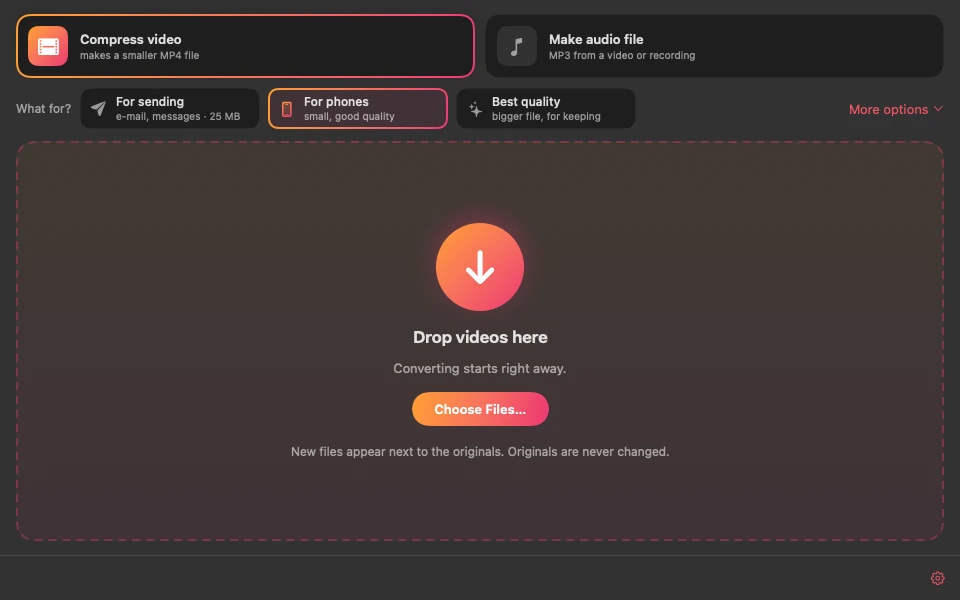
- A simple window with three ready goals: For sending (email and messages, 25 MB), For phones and Best quality. Or set size, quality, H.264 or H.265 yourself, and keep up to three of your own settings under Mine.
- Need an exact file size? Choose 10, 25, 50 MB or your own limit, and the video is encoded to fit.
- Extract audio from videos and recordings as MP3 or M4A, with Music, Speech (for lectures and interviews) and Small file goals. MP3 files are converted several at a time.
- Dark or light look, to match the way you like your Mac.
- Drop single files or whole folders. Originals stay untouched, and your files never leave your Mac.
Three steps. Then just drop.
- 01
Open FastAVConverter.
- 02
Choose Compress video or Make audio file, then pick a goal.
- 03
Drop videos or folders into the window. The results appear next to the originals.
Need a little help?
Is there a free trial?
Yes. FastAVConverter works for 7 days with all features, no key needed. A license is a one-time purchase at the regular price of $12.99 (or the launch offer shown above, while it lasts) plus applicable taxes, handled by our reseller FastSpring, and covers up to two Macs. Moving to a new Mac? Click Deactivate This Mac in FastAVConverter on the old one, then enter the same key on the new Mac.
Which files can it open?
Common video formats such as MP4, MOV, M4V, MKV, AVI, MTS and MPG with H.264, H.265, MPEG-2, ProRes, VP9 or AV1, and audio files such as WAV, M4A, MP3 and FLAC. Old Xvid/DivX and Windows Media (WMV, WMA) files are not supported.
Where are the results saved?
Next to the original, for example “holiday (smaller).mp4”. When you drop a folder, the results go to a new folder inside it, keeping its subfolders. Originals are never changed.
Why was a file skipped?
FastAVConverter does not save a result that would not be clearly smaller than the original, and skips files that already fit your chosen size or format.
Let’s work it out.
Questions, problems or ideas? Please include your macOS version and describe the file you converted.
support@robiapps.comApple, Mac and macOS are trademarks of Apple Inc. FastAVConverter is an independent app and is not affiliated with or endorsed by Apple. It uses FFmpeg libraries under the LGPL.