
Find your files. Even offline.
Quick Catalog – Find files on your cataloged drives, even when they’re unplugged
A fast disk catalog for Mac: external drives, SSDs, NAS shares, CDs and DVDs.
One-time purchase. No subscription.
Version 1.0 · 7 days with all features, no key needed. Open the disk image and drag Quick Catalog to Applications.
Coming soon to the Mac App Store, too.
Catalog drives and folders
Quick Catalog is a fast, simple disk catalog for your Mac. Catalog your external hard drives, SSDs, USB sticks, NAS shares, CDs, DVDs and folders once – then search and browse that saved list at any time, even when the drives are disconnected and sitting on a shelf.
- External hard drives, SSDs, USB flash drives, memory cards, CDs, DVDs and folders – plus network shares mounted in Finder.
- It saves only the list of files – names, paths, sizes and dates – not the files themselves. In our tests a catalog of a million files took about 45 MB.
- Fast: SSDs are read with several threads, and millions of files are no problem.
- Quick refresh usually reads only the folders that changed, and a full refresh is one click away. Interrupted? Finish Cataloging continues where it stopped.
- Drag a drive onto the window or onto the Dock icon to catalog it.
Search disconnected drives
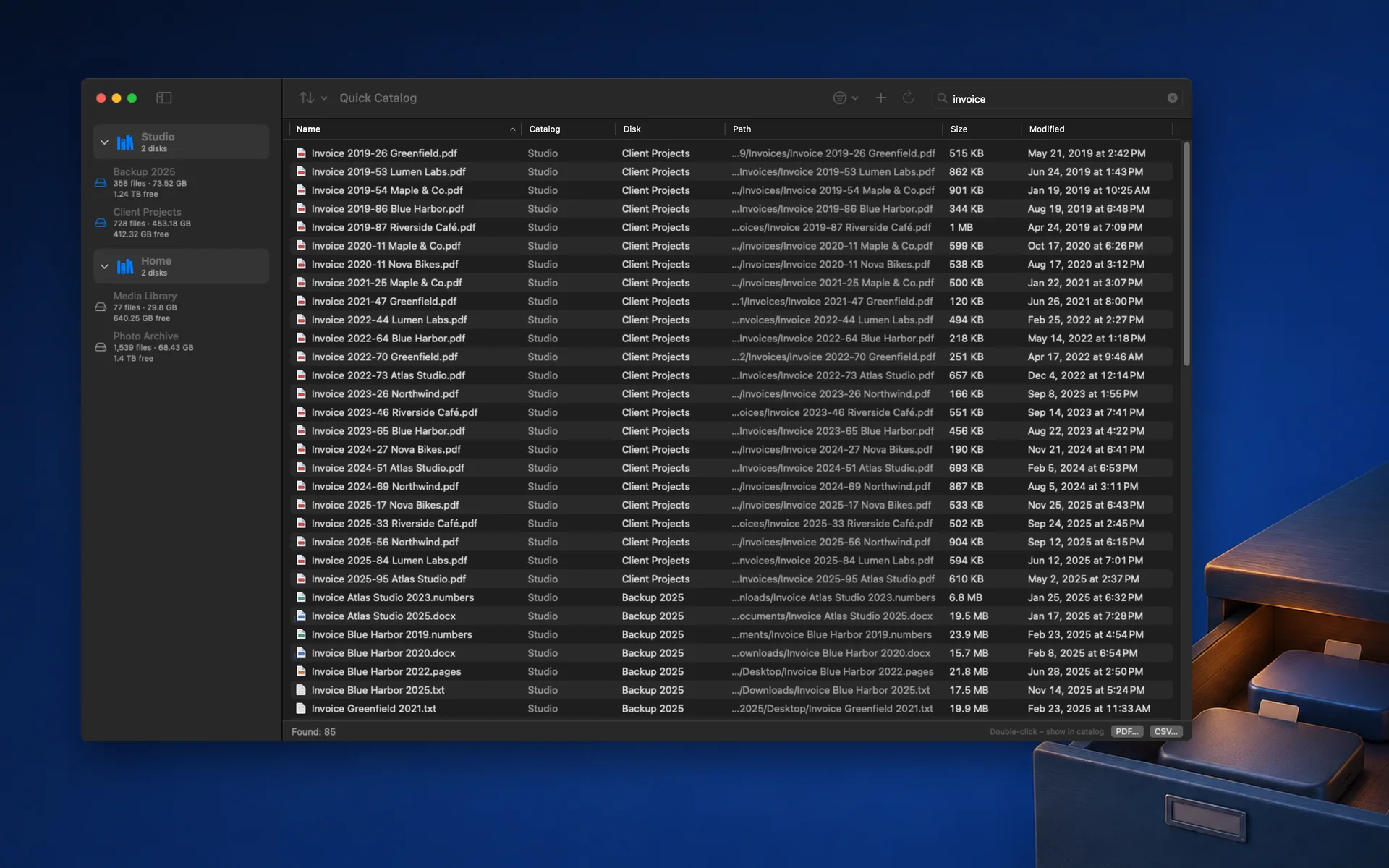
Stop plugging in drive after drive to find one file. Type a few letters and Quick Catalog shows where the file is – which catalog, which disk, which folder – even when that drive is in a drawer. All you need is the saved catalog.

- Fast search by name across all your disks, with several words at once.
- Capital letters and accents don’t matter: “lodz” finds “Łódź”.
- Filters by size, date modified and kind: photos, movies, music, documents, graphics and DTP, archives, applications or folders.
- Search everywhere, or only in the catalogs and disks you select.
- Double-click a result to open its folder in the catalog. When the disk is connected, open Quick Look – with Space on macOS 14 or later, or from the right-click menu.
Notes for every disk
Write a note for every disk and every catalog: what is on it and what must never be erased. Each disk also has its own storage location field – for example “shelf 3, box B” – so when you find a file, you know where to go and get the drive.

- Notes are searchable.
- The storage location appears in search results and in PDF and CSV exports; the disk note is included in the PDF list.
- A note for a whole catalog, too – for example “Client archive 2020–2024”.
- Notes are saved automatically as you type.
NAS and network drives
Catalog network shares mounted in Finder – SMB and WebDAV, for example from a Synology or QNAP NAS – at home, in the studio, or over the internet with a WebDAV client. Quick Catalog reads several network folders at the same time, and the catalog stays searchable when the NAS is switched off.

- In our test on a Synology NAS over WebDAV (13 November 2026), reading several folders at once was 4–10× faster than going folder by folder.
- Catalog a whole share or just the folders you need.
- Keep the catalog files wherever you like – on your Mac, on the NAS or in a synced folder.
- Quick Catalog doesn’t log in to servers itself: connect the share in Finder first.
Free space from the last scan
Every drive shows its free space from the last scan, if the drive reports it – connected or not. Know where 200 GB will fit before you even go to the shelf.

- Group drives into catalogs: Studio, Home, NAS, Archive, CDs – your way.
- Two drives with the same name are kept apart: Quick Catalog recognizes each disk by its unique ID when macOS provides it.
- Connect a drive with an old list and Quick Catalog offers to refresh it.
- Browse every disk like in Finder: folders, sizes, item counts, dates and full paths. Apps and photo libraries show as single items.
Export to PDF and CSV
Save a disk, a folder, a whole catalog or your search results as a PDF with file icons, or as a CSV file (separated by semicolons) for Excel and Numbers.

- For a disk or a folder, choose Folders only for a short, printable list – handy to keep in the box with the drive.
- The PDF includes each disk’s storage location and note; the CSV includes its storage location.
Simple, fast and paid once
Quick Catalog does one job and does it quickly. No account, no subscription and no cloud – your catalogs are saved where you choose and never sent anywhere.
- One-time purchase of $14.99; launch price $9.99 until January 15, 2027.
- A native app for Apple silicon and Intel Macs, in English, Polish, German, French, Spanish and Italian.
- Made for photographers, filmmakers, editors, designers and DTP studios, archivists, musicians, collectors of CDs and DVDs – and anyone with a drawer full of drives.
Three steps. Then just search.
- 01
Open Quick Catalog and create a catalog – for example Studio, Home or NAS.
- 02
Drag a drive, a network share or a folder onto the window and wait while its files are listed. Add where the drive is kept and a note.
- 03
Disconnect the drive. Any time later, type a file name – Quick Catalog shows which disk it is on and where that disk is kept.
FAQ
Can I find files on a disconnected drive?
Yes. Quick Catalog saves a list of the files when you catalog a drive; you can search and browse that list any time you can open the saved catalog, without connecting the drive.
Does it work with NAS and network drives?
Yes: it reads network shares mounted in Finder (SMB, WebDAV – for example from Synology or QNAP), including WebDAV shares connected over the internet with a WebDAV client. Quick Catalog doesn’t log in to servers itself.
Can I write notes for each disk?
Yes, for every disk and catalog, plus a separate storage location for each disk (for example “shelf 3, box B”). Notes are searchable; the storage location is included in PDF and CSV, the disk note in the PDF list.
Does it copy my files?
No. It stores only names, paths, sizes and dates. The catalog size depends on the number and length of file names (in our tests about 45 MB for a million files).
Is it a subscription?
No. It’s a one-time purchase: $14.99, with a launch price of $9.99 until January 15, 2027. From robiapps.com you can try it free for 7 days first, no key needed; a license covers up to two Macs.
Which versions of macOS are supported?
macOS 13 Ventura or later, on Macs with Apple silicon or Intel processors.
Let’s work it out.
Questions, problems or ideas? Please include your macOS version and the kind of drive (external disk, NAS, CD/DVD).
support@robiapps.comApple, Mac, macOS, Finder and Quick Look are trademarks of Apple Inc. Synology is a trademark of Synology Inc. QNAP is a trademark of QNAP Systems, Inc. Quick Catalog is an independent app and is not affiliated with or endorsed by Apple, Synology or QNAP.