
Print PDF Check
Paser: Print PDF Check
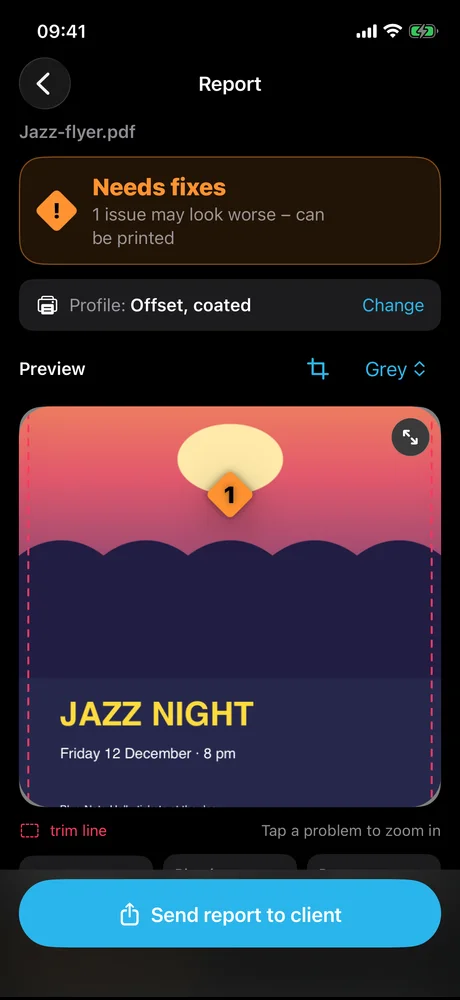
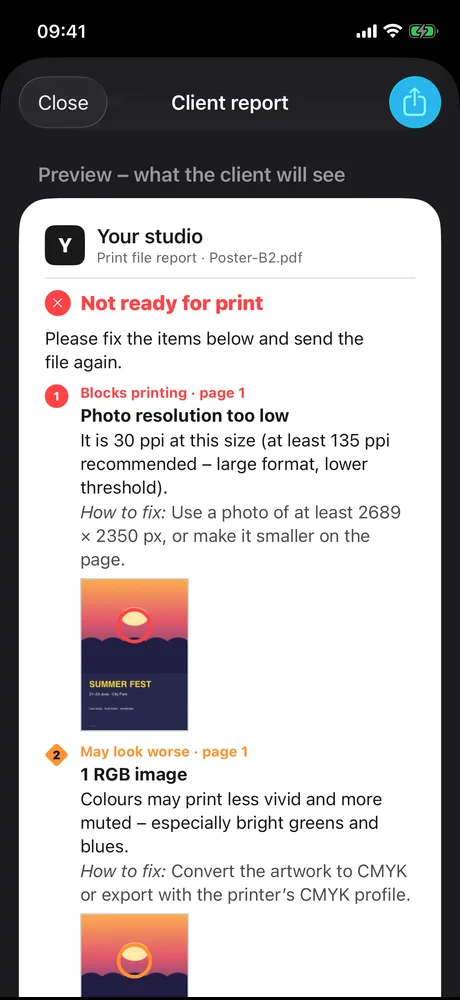
Check a client’s print PDF on your phone – iPhone or Android – before it goes to the printer. Paser checks a PDF the way a print shop does: size, bleed, fonts, photo resolution, colours and ink total, against your print shop’s requirements. You see problems marked on the page, zoom in to real size and send the client a clear report – what to fix and how. The file never leaves your phone.
What’s inside
- Print checkSize, bleed, embedded fonts, photo resolution, RGB and spot colours, ink total, text in the safe zone.
- Problems on the pageNumbered markers right on the page; tap one to zoom in.
- Full-screen previewPinch to zoom, 1:1 real size, trim size in mm or inches.
- Report for the clientPDF, image or text, with “how to fix” for each problem, in 6 languages.
- Print profilesOffset, digital, large format… or set your own print shop’s requirements.
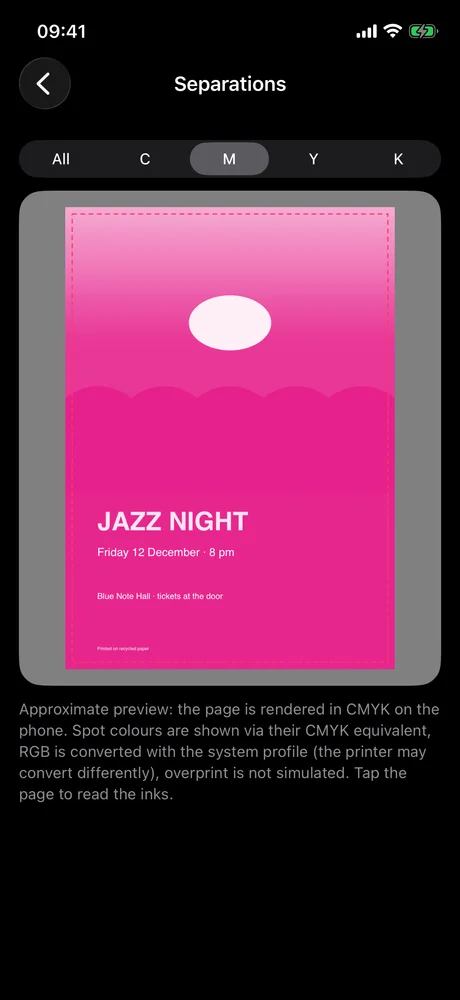
- Studio toolsC, M, Y, K separations, ink coverage map, image list, fonts and spot colours.
- Quick check from ShareOpen a PDF from Mail or WhatsApp straight in Paser.
- 7 calculatorsSize and bleed, units, book spine, colour (HEX/RGB/CMYK), folds and creases, items per sheet, banners.
Free, Pro and Studio
| Free | Pro | Studio | |
|---|---|---|---|
| PDF checks | 3 / month | unlimited | unlimited |
| All calculators | ✓ | ✓ | ✓ |
| “Trimmed” preview | ✓ | ✓ | ✓ |
| Report with your logo, no Paser footer | – | ✓ | ✓ |
| Report in any of 6 languages | – | ✓ | ✓ |
| Your own message and signature | – | ✓ | ✓ |
| Your own print profiles | – | ✓ | ✓ |
| C, M, Y, K separations | – | – | ✓ |
| Ink coverage map | – | – | ✓ |
| Image, font and colour list | – | – | ✓ |
| “Trimmed” view in the client report | – | – | ✓ |
| Quick check from Share | – | – | ✓ |
Pro and Studio are one-time purchases in the App Store or Google Play – no subscription, no ads. You can upgrade from Pro to Studio later.
Need a little help?
Are my files uploaded anywhere?
No. Paser checks PDFs on your phone and never sends them anywhere. There is no account.
How do I open a PDF from Mail or WhatsApp?
Tap the file, then Share → Paser. With Studio, “Quick check” shows the result right in the Share menu.
Can I use my print shop’s requirements?
Yes. Pick a ready-made profile, or with Pro/Studio set your own bleed, safe zone, photo resolution and ink limit.
Is this the final check?
It is a preliminary automatic check. The print shop does the final check.
How do I restore my purchase on a new phone?
Settings → Paser Pro & Studio → Restore purchases.
How do I change the language?
Paser uses your phone’s language. On iPhone you can also pick one just for Paser: Settings → Paser → Language.
Let’s work it out.
Questions and feedback? Write to us:
support@robiapps.com